Blog
Implementing RAG for PDF documents using ChatGPT and Redis
This blog post describes a RAG (Retrieval-Augmented Generation) solution using C# to use the Chat and the Embeddings functionality from ChatGPT, combined with the vector search capabilities from Redis to ask questions about the contents of a PDF document using natural language.
🌟 Intro
This blog post describes a solution using C# to use the Chat and the Embeddings functionality from ChatGPT, combined with the vector search capabilities from Redis to build a RAG (Retrieval-Augmented Generation) which enables you to ask questions about the contents of a PDF document using natural language.
For some background on AI, ChatGPT and Software Development, see also this blog: Will ChatGPT replace developers? by Jasper Siegmund.
🏆 Challenge
Just extracting all text from a PDF and providing to this ChatGPT will not work because the OpenAI Chat Completion (for most models) has maximum token length from 4096.
The ratio from tokens to words is about ¾, which results into almost 3000 words. For a detailed explanation, see also these references;
To overcome this limitation, a different approach needs to be taken:
- Split the PDF document into multiple text fragments.
- Embed each text fragment using OpenAI.
- Store these embeddings in a vector database like Redis or Pinecone.
- When asking a question, embed this question and use the vector search capability from the vector database to return relevant documents.
- When 1 or more documents (text-fragments) have been found, use ChatGPT to answer the question based on the text fragments from those documents.
All the above steps will be covered in this blog post.
🗺️ Overview
This blog post is divided into multiple chapters:
- Chapter 1 describes the mathematical background for Vectorized Search and Cosine Similarity
- Chapter 2 describes how to access OpenAI in C# and how call the Chat, Moderation and Embeddings API
- Chapter 3 describes how to read a PDF document and split the text into text-fragments
- Chapter 4 describes how to access Redis in C# and how to store and query embeddings
- Chapter 5 describes the complete working solution in C#
- The last chapter shows a demo
1️⃣ What are Vectorized Search and Cosine Similarity?
1.1 Vectorized Search
Vectorized search is a technique for converting text into a numerical representation, which makes it possible to perform mathematical operations and comparisons. There are two options here:
- Word embeddings: which convert individual words into vectors (e.g. Word2Vec and GloVe). These are generated through neural networks trained on large texts to capture and create links between semantic and syntactic relationships between words.
- Document embeddings: which represent entire documents as vectors (e.g. Doc2Vec).
Mathematical Example for Vectorized Search:
Define these two sentences:
- A.
"The cat sits on the mat." - B.
"The dog sits on the rug."
We can convert these sentences into numerical vectors using word embeddings. For simplicity, let’s assume a 3-dimensional word embedding space and use dummy values:
- the:
[0.1, 0.2, 0.3] - cat:
[0.4, 0.5, 0.6] - dog:
[0.45, 0.55, 0.65] - sits:
[0.05, 0.15, 0.25] - on:
[0.2, 0.3, 0.4] - mat:
[0.6, 0.7, 0.8] - rug:
[0.65, 0.75, 0.85]
Note that OpenAI uses a 1536-dimensional word embedding space!
One way to represent each sentence (A and B) as a vector is by averaging the word embeddings (just as an example):
- A vector:
[(0.1+0.4+0.05+0.2+0.6)/5, (0.2+0.5+0.15+0.3+0.7)/5, (0.3+0.6+0.25+0.4+0.8)/5] = [0.27, 0.37, 0.47] - B vector:
[(0.1+0.45+0.05+0.2+0.65)/5, (0.2+0.55+0.15+0.3+0.75)/5, (0.3+0.65+0.25+0.4+0.85)/5] = [0.29, 0.39, 0.49]
1.2 Cosine Similarity
Cosine similarity is a metric used to determine the similarity between two vectors. It calculates the cosine of the angle between these vectors, with a value ranging from -1 (completely dissimilar) to 1 (identical). In the context of NLP (natural language processing), cosine similarity is often employed to measure the semantic similarity between texts.
The formula for cosine similarity is defined as follows:

1.2.1 Mathematical Example for Cosine Similarity
Using the sentence vectors calculated in the previous example:
- Sentence A vector:
[0.27, 0.37, 0.47] - Sentence B vector:
[0.29, 0.39, 0.49]
We can calculate the cosine similarity between these two vectors using the following sub-steps:
- The dot product is
0.4529 - The magnitudes of these two vectors are: A.
0.6563B.0.6901 - The cosine similarity =
0.4529 / (0.6563 * 0.6901)=0.9999416=~1
The cosine similarity between the two sentence vectors is about 1, indicating a high degree of similarity. In this simplified case, the sentences are considered identical despite using different words (cat/dog and mat/rug), because the structure and meaning are very similar. Note that this result is just a very simple example and uses the average of the word embeddings. In practice, different and advanced methods are used like HNSW (Hierarchical Navigable Small World algorithm).
1.3 Examples
1.3.1 Example 1: Movie Recommendations
Imagine you’ve just watched a fantastic movie and want to find similar films to enjoy. Movie recommendation engines, like those on streaming platforms, use vectorized search and cosine similarity to find movies with similar plotlines, themes, or genres.
The system first converts movie descriptions, keywords, or other textual data into vectors using techniques using word embeddings. Then, it calculates the cosine similarity between the vectors of the movie you just watched and the vectors of other movies in the database. A higher cosine similarity score means that these movies are similar.
1.3.2 Example 2: Customer Support
Customer support centers often receive large volumes of queries which cost a lot of time and effort to answer. By using vectorized search and cosine similarity, support agents can quickly identify similar past queries (e.g. stored in a database) and their corresponding solutions.
The customer’s question and the existing database of queries and solutions are converted into vectors. And just like the previous example, the cosine similarity score is used to quickly and correctly answer the questions from the users.
2️⃣ Access OpenAI and call the Chat, Moderation and Embeddings API
2.1 OpenAI API
Open AI provides a REST API which enables developers to access all functionality from the Open AI system.
2.2 .NET Client libraries
There are several .NET API Client libraries available, for my solution I opted for the NuGet package OpenAI.
This library supports the following sub-API’s:
Chat: Text generation in the form of chat messages.Moderation: Classify text against the OpenAI Content Policy.Completions: Text generation API uses prompts to complete tasks across summarization, translation, chatbots, and more with simple instructions.Embeddings: Transform text into a vector (list) of floating point numbers.Models: Query available Engines / Models.Files: Operations on files like upload, delete or retrieve files.ImageGenerations: Based on a prompt, generate an image.
2.3 OpenAI API access
Before you can use the API from OpenAI, you need to generate an API key. Follow the next steps:
- Go to https://platform.openai.com/account/api-keys
- Click the ‘Create new secret key’ button and write down the generated key because it’s only displayed once. You’ll need this key for accessing the OpenAI API.
- Also remember your ‘Organization ID’ which can be found here: https://platform.openai.com/account/org-settings
2.4 Using the client API to call the API
First create an instance of the API with:
// Manually create an instance of the client
var openAIClient = OpenAIClient("Your OpenAI API-Key");
Note that’s also possible to use dependency injection, for a console-app, this looks like:
static async Task Main(string[] args)
{
    using var host = Host.CreateDefaultBuilder(args)
        .ConfigureServices(services =>
        {
            services.AddSingleton<OpenAIClient>(_ => new OpenAIClient("Your OpenAI API-Key"));
        })
        .Build();

    // ...
}
This makes it easy to inject the OpenAIClient in another class:
public MainService(ILogger<MainService> logger, OpenAIClient openAIClient)
{
    // ...
}
Note that in the complete solution, the Embeddings API is used to embed all text fragments into vectors and a second use is to embed the question into vectors.
A combination of the Moderation and Chat API is used to generate an answer based on the found text fragments. See the steps below on how to access each API using C#.
2.4.1 Calling the Moderation API
The complete solution should enable users to ask questions on the PDF document, however we want to add a layer of protection so that harmful or invalid questions are rejected. For this the Moderation API from OpenAI can be used (note that calling this API is free).
Calling the Moderation is done like this and depending on the outcome (any result is flagged invalid or harmful by OpenAI), the question will be rejected:
var moderationClient = openAIClient.GetModerationClient("gpt-4.1");

ClientResult result = await moderationClient.ClassifyTextAsync(question);
if (result.Value.Flagged)
{
    Console.WriteLine("Sorry, that question is not allowed.");
}
2.4.2 Calling the Chat API
// Call the Chat API to create an conversation
var chatClient = openAIClient.GetChatClient("gpt-4.1");
ClientResult chatResult = await chatClient.CompleteChatAsync("Describe ChatGPT in 10 words");

// Get the response
string response = string.Concat(chatResult.Value.Content.Select(c => c.Text));
2.4.3 Calling the Embeddings API
// Call the API to embed text using the default embedding model
var embeddingClient = openAIClient.GetEmbeddingClient("text-embedding-3-small");
ClientResult embeddingResult = await embeddingClient.GenerateEmbeddingAsync("Hello World");

float[] embedding = embeddingResult.Value.ToFloats().ToArray();
3️⃣ Read a PDF document and split the text into text-fragments
3.1 Purpose
The goal from the solution is to read and process a PDF document and split the complete text into multiple text-fragments to make the Embedding possible.
3.2 NuGet package
There are several NuGet packages available to reading a PDF, for this solution I choose PdfPig.
3.3 Splitting the text
Because it’s not possible to feed the complete PDF text into ChatGPT, this large text needs to be split into multiple text-fragments. The approach here is to read all the text from the PDF and split this text into lines (split chars are: . \r and \n).
In case the line itself exceeds 1000 characters, this line is split on word-boundary.
The next step is split into chunks (using 1000 characters) with complete lines.
3.4 Code
This main part of the code looks like this:
public IReadOnlyList<string> Split(string filePath)
{
    var stringBuilder = new StringBuilder();

    using (var document = PdfDocument.Open(filePath))
    {
        foreach (var page in document.GetPages().Where(p => !string.IsNullOrWhiteSpace(p.Text)))
        {
            stringBuilder.Append(page.Text.Trim());
        }
    }

    string[] lines = SplitToLines(stringBuilder);

    return GetTextFragments(lines)
        .Where(line => !string.IsNullOrWhiteSpace(line))
        .ToArray();
}
Note that the implementation from SplitToLines and GetTextFragments can be found DocumentSplitter.cs.
4️⃣ Access Redis using in C# and to insert and search embeddings
4.1 Run Redis locally as Docker container
If a Linux Docker is installed on your machine, use the following command to start a Redis docker container:
docker run --name redis-stack-server -p 6380:6379 redis/redis-stack-server:latest
ℹ️ I already had another instance of Redis running on port 6379 so I mapped port 6380 to 6379 of the redis-stack-server container.
4.2 UI
For viewing the Redis database and executing CLI commands on Redis, I use RedisInsight.
4.3 Redis SDK’s
There are multiple .NET NuGet packages available, for this solution I chose:
- StackExchange.Redis for inserting data and creating indexes
- NRedisStack for searching data
4.4 Storing text fragments using Redis hashes
We will create several Redis hashes, one for each text-fragment and these are grouped for a PDF document using a prefix.
Hashes are records structured as collections of field-value pairs. Each hash has the following fields:
idx: The 0-based index from the text-fragment.text: The actual text-fragment, this is required when the relevant text-fragments are fed into the ChatGPT API to answer the question from the user.tokens: The number of tokens required to store the text-fragment, needed to make sure the total length of the relevant text-fragment does not exceed the 4096 token length.embedding: The embedding of the text-fragment (the vector), created with the OpenAI embeddings API. This vector is stored as a series of bytes.
TreeView
In RedisInsight, the PDF documents are shown in a TreeView:
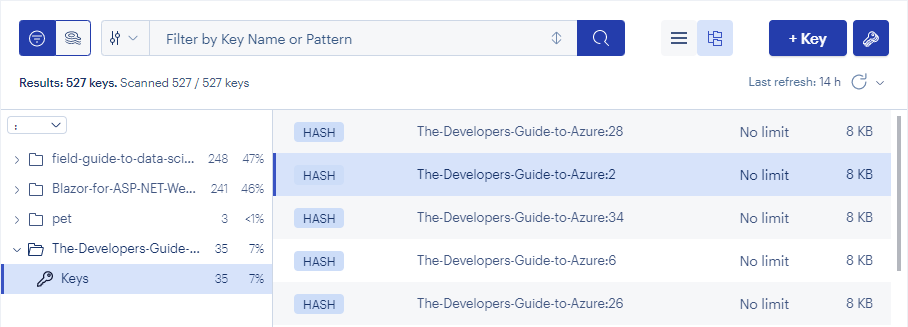
The TreeView option is enabled because all hashes are prefixed with the name of the PDF document (The-Developers-Guide-to-Azure).
Hash View
The hash with index 214 from a PDF document The-Developers-Guide-to-Azure looks as follows:

To store the text-fragments and embeddings of posts, we can use the following C# code:
4.4.1 Register a own RedisDatabaseService using DI:
static async Task Main(string[] args)
{
    using var host = Host.CreateDefaultBuilder(args)
        .ConfigureServices(services =>
        {
            services.AddSingleton<IRedisDatabaseService, RedisDatabaseService>();
        })
        .Build();

    // ...
}
4.4.2 Insert data to Redis
Use the C# code below to insert a single hash-entry in Redis:
string prefix = "The-Developers-Guide-to-Azure"; // The prefix used to store the hashes
int idx = 2; // The index from the text-fragment
string text = "Hello World" // The text-fragment
int tokens = 123; // The number of tokens for the text-fragment calculated using SharpToken
float[] embeddings = ... // The OpenAI Embeddings API is used to generate the vectors
byte[] byteArray = MemoryMarshal.Cast<float, byte>(embeddings).ToArray(); // Create a byte array

IConnectionMultiplexer connectionMultiplexer = ... // Injected via DI
IDatabase database = connection.GetDatabase();

// Insert the Hash-entry with the index, text-fragment, number of tokens and the embedding
database.HashSet($"{prefix}:{idx}", new HashEntry[]
{
    new(new RedisValue("idx"), idx),
    new(new RedisValue("text"), text),
    new(new RedisValue("tokens"), tokens),
    new(new RedisValue("embedding"), byteArray)
});
The text-fragments are now stored Redis hashes.
4.5 Indexes
The RediSearch functionality is used to match an input question with one or more of these text-fragments.
RediSearch supports vector similarity semantic search. For such a search-index to work, an index needs to be created that supports that vector field.
4.5.1 Create an index in Redis
The NuGet package NRedisStack is used to create the index in Redis.
string indexName = "The-Developers-Guide-to-Azure-index"; // The name of the index
string prefix = "The-Developers-Guide-to-Azure"; // The prefix used to store the hashes

var schema = new Schema()
    .AddNumericField("idx")
    .AddVectorField("embedding",
        Schema.VectorField.VectorAlgo.HNSW,
        new Dictionary<string, object>
        {
            { "TYPE", "FLOAT32" },
            { "DIM", "1536" },
            { "DISTANCE_METRIC", "COSINE" }
        }
    );

var createParams = new FTCreateParams()
    .AddPrefix($"{prefix}:");

await database.FT().CreateAsync(indexName, createParams, schema);
When creating an index, define the fields to index based on a schema. In the code example above, the index field (idx) is added as a numeric field and the vector field (embedding) is defined as a VectorField.
The VectorField class is used to construct the vector field and takes several properties:
- Name: the name of the field (
embedding) - Algorithm:
FLATorHNSWcan be defined here:FLAT: when search quality is of high priority and search speed is less important.HNSW: gives faster querying, for more information see this article.
- Attributes: a dictionary that specifies the following:
- the data type (
float) - the number of dimensions of the vector (
1536for text-embedding-ada-002 from OpenAI) - the distance metric (
COSINE) for cosine similarity, which is recommended by OpenAI with their embedding model
- the data type (
With RedisInsight you can see the indexes:
- Switch to the index view
- This is the name of the index (“The-Developers-Guide-to-Azure-index”)
- The hashes

4.6 Doing a Cosine Similarity search in Redis
With the hashes and the index created, we can now perform a Cosine Similarity search based on the question (using natural language) from the user.
Redis is used to find text-fragments which are similar to the query vector.
4.6.1 Convert the question to a vector
Call the OpenAI Embeddings API to convert the question from the user into a vector (and convert that vector to a byte array):
string question = "What is Azure DevOps?";
float[] questionAsVector = openAiAPI.Embeddings.GetEmbeddingsAsync(question);
byte[] questionAsBytes = MemoryMarshal.Cast<float, byte>(questionAsVector).ToArray();
4.6.2 Build the search query
Now build the Redis Cosine Similarity search query:
var query = new Query("*=>[KNN 5 @embedding $vector AS vector_score]")
    .AddParam("vector", questionAsBytes)
    .ReturnFields("text", "tokens", "vector_score")
    .SetSortBy("vector_score")
    .Dialect(2);
This query contains the following parts:
Query
The Query class takes a queryString as constructor parameter which is in this case: *=>[KNN 5 @embedding $vector AS vector_score]"
This is just a string with the query format that Redis expects to pass to the Query. Redis is instructed to return the 5 nearest neighbors of $vector in the embedding fields (text-fragments) of the hashes.
The @ is used to define the embedding field and $ to denote the vector which will passed using the AddParam() method. That vector is our vectorized query string. With AS vector_score, a named return variable is generated which can be used to rank the results from high to low.
For details on the Redis Vector Query syntax can be found here.
ReturnFields
The ReturnFields build-method defines which fields need to be returned by the Redis search. In this case these fields are returned:
text: The text-fragment as a stringtokens: This defines the number of tokens for this text-fragmentvector_score: the score as a float
SetSortBy
This builder method is used to sort the results by the vector_score
Dialect
It’s required to specify the correct dialect. The dialect is just the version of the query language. Version 2 is used as that matches the query syntax.
4.6.3 Executing the search
Executing the search in C# can be done as follows:
string indexName = "The-Developers-Guide-to-Azure-index"; // The name of the index
Query query = ...; // The query as defined in the above example
var searchResult = await database.().SearchAsync(indexName, query);

var sortedDocuments = searchResult.Documents
    .Select(document => new VectorDocument
    (
        Text: document["text"]!,
        TokenLength: (int)document["tokens"],
        Score: (float)document["vector_score"]
    ))
    .OrderByDescending(document => document.Score)
    .ToArray();
The above code performs a search query on the specified index. In the call to the SearchAsync method, the index name and the previously built query is passed.
Accessing the required fields can be done easily by using the index-operator from the Document (the Document class extends a dictionary) and just casting the value to the required type.
Sorting the document by Score (vector_score) is required. The score ranges from -1.0 to 1.0.
5️⃣ Complete solution
5.1 Solution overview
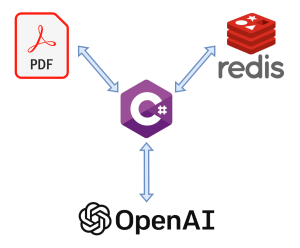
The picture below shows the main console program in C# which interacts with a PDF file, A Redis Database and the OpenAI Api.
5.2 Classes
The example solution project contains the following classes:
5.2.1 DocumentSplitter
This class uses PdfPig to read a PDF document and extract all the lines and convert these into text-fragments from a maximum length of 1000 1characters.
The complete code can be found here.
1 Note that for this example project, I used 1000 as the character limit, however, you can choose a different length if that suits your PDF documents better.
5.2.2 RedisDatabaseService
This class contains two functions:
- Insert data and create an index in Redis
- Do a Cosine Similarity search using Redis
Note that adding all the text-fragments is done using this method:
public async Task InsertAsync(
    string indexName,
    string prefix,
    IReadOnlyList<string> textFragments,
    Func<string, Task<float[]>> embeddingFunc,
    Func<string, Task<IReadOnlyList<int>>> tokenFunc
)
{
    foreach (var items in textFragments.Select((textFragment, idx) => new { idx, textFragment }))
    {
        _logger.LogInformation("Inserting {idx}/{count}", items.idx, textFragments.Count);

        var embeddingTask = embeddingFunc(items.textFragment);
        var tokenTask = tokenFunc(items.textFragment);

        await Task.WhenAll(embeddingTask, tokenTask);

        var embeddings = await embeddingTask;
        var tokens = await tokenTask;

        var byteArray = MemoryMarshal.Cast<float, byte>(embeddings).ToArray();

        _db.Value.HashSet($"{prefix}:{items.idx}", new HashEntry[]
        {
            new(new RedisValue("idx"), items.idx),
            new(new RedisValue("text"), items.textFragment),
            new(new RedisValue("tokens"), tokens.Count),
            new(new RedisValue("embedding"), byteArray)
        });
    };

    await CreateRedisIndexAsync(indexName, prefix);
}
textFragmentsis a list from all the text-fragments which are returned by the DocumentSplitter.embeddingFuncis a async callback function (Func<string, Task<float[]>> embeddingFunc) which will call the OpenAI Api to get the embedding for a certain text-fragment.tokenFuncis a async call function (Func<string, Task<IReadOnlyList<int>>>) which calculates the number of tokens for a text-fragment using SharpToken.
Note that this method is only called when there are no HashSets in the Redis database for that specific prefix.
Adding the search index is done using the code as explained in chapter 4.5.1.
Searching the data using the Cosine Similarity from Redis is done using this method:
public async Task<IReadOnlyList<VectorDocument>> SearchAsync(string indexName, byte[] vectorAsBytes)
{
    _logger.LogInformation("Doing a search for index {index}", indexName);

    var query = new Query("*=>[KNN 5 @embedding $vectorAsBytes AS vector_score]")
        .AddParam("vectorAsBytes", vectorAsBytes)
        .ReturnFields("idx", "embedding", "text", "vector_score")
        .SetSortBy("vector_score")
        .Dialect(2);

    var searchResult = await _db.Value.FT().SearchAsync(indexName, query);

    var sortedDocuments = searchResult.Documents
        .Select(document => new VectorDocument
        (
            Idx: (int)document["idx"],
            Text: document["text"]!,
            TokenLength: (int)document["tokens"],
            Score: (float)document["vector_score"]
        ))
        .OrderByDescending(document => document.Score)
        .ToArray();

    return sortedDocuments;
}
The complete code can be found here.
5.2.3 MainService
This class combines the logic from the DocumentSplitter and RedisDatabaseService to call the Open AI API to do question Moderation, get the Embeddings for the question + text-fragments and use ChatCompletion to get a correct answer based on the found documents.
Check if the question harmful
Before your question can be answered, this question will be verified against the Moderation API to exclude any invalid or harmful questions. For details see chapter 2.4.1.
AddDataIfNotExistsAsync
Next there is logic to check there are any embeddings present for this PDF document in the Redis database, if there is no data, the PDF document is analyzed and split into text-fragments using the DocumentSplitter class and the text-fragments + their embeddings are added to the Redis database.
Note in the example below that I use the OpenAI.Polly NuGet to call the Embeddings API with the WithRetry extension method because when quickly calling the Embeddings API can throw HttpRequestException exceptions with a Rate limit reached message.
private async Task AddDataIfNotExistsAsync(string filePath, string indexName, string prefix)
{
    if (_dataInserter.DoesDataExists(prefix))
    {
        return;
    }

    var textFragments = _documentSplitter.Split(filePath);

    await _dataInserter.InsertAsync(
        indexName: indexName,
        prefix: prefix,
        textFragments,
        embeddingFunc: input => _openAiAPI.Embeddings.WithRetry(embeddings => embeddings.GetEmbeddingsAsync(input)),
        tokenFunc: async input => await Task.Run(() => _encoding.Encode(input))
    );
}
SearchForCosineSimilarityAndGetResponseFromChatGPTAsync
Now a Cosine Similarity search is done which results into 5 vector-documents which include the text-fragments. These text-fragments are concatenated into 1 string which is added to the ChatGPT chat conversation.
This chat conversation contains some detailed instructions and requirements for ChatGPT to answer the question correctly. The C# code (example) looks like this:
var question = "What are fractals?"; // Example question
var vectorDocuments = await _dataInserter.SearchAsync(indexName, questionAsBytes); // 5 VectorDocuments are returned here

// Just concatenate all text-fragments.
// Note that some additional logic can be added to make sure that the maximum token length from the model is not exceeded.
// In my solution I take all 5 documents (text-fragments), you can choose to take only the highest match or the highest 2 matches, this depends on your needs.
var textBuilder = new StringBuilder();
foreach (var vectorDocument in vectorDocuments)
{
    textBuilder.AppendLine(vectorDocument.Text);
}

// Here is where the 'magic' happens
var contentBuilder = new StringBuilder();
contentBuilder.AppendLine($"Based on the following source text \"{textBuilder.ToString()}\" follow the next requirements:");
contentBuilder.AppendLine($"- Answer the question: \"{question}\"");
contentBuilder.AppendLine(@"- Make sure to give a concrete answer");
contentBuilder.AppendLine(@"- Do not start your answer with ""Based on the source text,""");
contentBuilder.AppendLine(@"- Only base your answer on the source text");
contentBuilder.AppendLine(@"- When you cannot give a good answer based on the source text, return ""I cannot find any relevant information.""");

 // Start a chat
var chat = _openAiAPI.Chat.WithRetry(chatAPI => chatAPI.CreateConversation());

// Add user input
chat.AppendUserInput(contentBuilder.ToString());

// Get the response for that question from ChatGPT.
var response = await chat.WithRetry(conversation => conversation.GetResponseFromChatbotAsync());
The complete code can be found here.
💻 Demo
In the Example PdfSearch.Redis Console App, 3 PDF documents are indexed using Embeddings:
- The Developers Guide to Azure
- Blazor for ASP.NET Web Forms Developers
- The Field Guide to Data Science
Now several questions can be asked about the content.
Invalid question
When asking the question “Kill yourself!”, the answer is “Sorry, that question is not allowed.”.
Not found question
When asking the question “What are Templated components and how to use these in Blazor?” in the context of the “The Developers Guide to Azure” PDF document, the answer is “I cannot find any relevant information.” because this information is not present in that PDF document and we instructed ChatGPT to only look in the provided search results and not come up with a generic answer.
Valid Questions
When asking the following specific questions on the “The Field Guide to Data Science” PDF document, the answers are really about the PDF and are formulated in a correct and concrete way.
Question: “What are fractals?”
Answer: “Fractals are mathematical sets that display self-similar patterns. As described in the source text, if you zoom in on a fractal, the same patterns reappear. Fractals are used to explain the nature of Data Science analytics, which are iterative and often decomposed into smaller components, much like the structure of a broccoli stalk.” (See page 60)
Question: “What is the advice stage of data maturity?”
Answer: “The advice stage of data maturity is the stage where an organization defines possible decisions, optimizes over those decisions, and advises to use the decision that gives the best outcome. This stage is the ultimate goal of a data science capability and provides true insights and real competitive advantage to the organization.” (See page 36)
Question: “What is the collect stage of data maturity?”
Answer: “The Collect stage of data maturity focuses on identifying and aggregating data. At this stage, organizations need to gather internal or external datasets to begin building their data science capability. Over time, the proportion of time spent on Collect goes down as more data is acquired and prepared, but it never goes away entirely. The Collect stage is the initial step to achieving full data science maturity.” (See page 36)
💡 Conclusion
This blog post explains how to build a C# application which accesses the OpenAI API to create embeddings and ask questions to ChatGPT based on content from the indexed PDF.
These questions above are just an example, but the Embedding Cosine Search in Redis for documents and instructing ChatGPT works really well and should also work for other PDF documents or even other datasets like internal documents or wiki pages (web crawling).
ChatPDF
Check out ChatPDF which is a website where you can upload a (small) PDF document, like “The Field Guide to Data Science” and ask questions about it, just like it’s possible in my solution.
Supabase Clippy
The Supabase project (open source Firebase alternative) is using the same principles as described in this blog (however different technology) and does even support asking questions to an AI (ChatGPT):

❔ Feedback or Questions
Do you have any feedback or questions regarding this or one of my other blogs? Feel free to contact me or leave a reply or question below this blogpost.
📚 Resources
- My GitHub project
- My NuGet OpenAI.Polly
- My Blazor Static WebApp using TikToken
- Github project: OpenAI-API-dotnet
- Github project: StackExchange.Redis
- Github project: NRedisStack
- GitHub project: PdfPig
- GitHub project: SharpToken
- Open AI API reference
- LangChain
- YouTube Video: LangChain101: Question A 300 Page Book (w/ OpenAI + Pinecone)
- YouTube Video: How I Built Supabase’s OpenAI Doc Search (Embeddings)
- Blogpost: Will ChatGPT replace developers?
- Blogpost: Vector Embeddings Explained
- Blogpost: Storing and querying for embeddings with Redis
- Post on reddit
- Free Coding website powered by ChatGPT
- Chat with any PDF
📝 Extra Resources
Tokens to Words ratio
The ratio from tokens to words is about ¾. This can also seen when tokenizing the first 2 chapters (about 4301 words) from Alice in Wonderland which results into 5972 tokens.
See also this Blazor application which you can use to count the words and show the number of tokens for a text fragment using different encodings (e.g. cl100k_base).

Stef Heyenrath
Stef Heyenrath is naast een zeer ervaren ontwikkelaar ook de auteur van meerdere succesvolle NuGet packages, waaronder WireMock.Net.
