Blog
Integrating your own business logic and data with an LLM
With the rise of powerful LLMs (Large Language Model) like OpenAI’s models, developers now have incredible tools in their hands to build intelligent applications. SemanticKernel is a software library built by Microsoft that brings these language models to life by combining them with custom code so that you can bring in your own business logic and data. This post will dive into how you can use plugins with SemanticKernel in C#. For the examples in this post I use Azure OpenAI with gpt-4o as the LLM.
1️⃣What Is SemanticKernel?
Semantic Kernel is an open-source software library designed to bridge the gap between natural language processing and programming. It is available as a NuGet package. With SemanticKernel you can easily create a client to interact with the LLM. By providing prompts the LLM will give responses just like it does, for example, with ChatGPT. By combining natural language prompts with code plugins, Semantic Kernel allows developers to create seamless, AI-powered applications while having the possibility to integrate custom logic and data.
Let me first show you how you can make a simple chat client using SemanticKernel. First you need to install the Microsoft.SemanticKernal NuGet package.
dotnet add package Microsoft.SemanticKernel
When you have done this you can build a chat client using the following code:
using Microsoft.SemanticKernel;
using Microsoft.SemanticKernel.ChatCompletion;

var deploymentName = "";
var endpoint = "";
var apiKey = "";

var builder = Kernel.CreateBuilder().AddAzureOpenAIChatCompletion(deploymentName, endpoint, apiKey);
Kernel kernel = builder.Build();

var chatCompletionService = kernel.GetRequiredService();
What we see here is that we need 3 parameters to connect to our LLM. Those 3 parameters are specific for your deployment. When using Azure OpenAI you can find them in Azure OpenAI studio. See the following screenshot:

Next to that there is a Kernel that can create a builder to build a chat client. With this chat client you can start talking to your LLM. For example you can do the following.
var result = await chatCompletionService.GetChatMessageContentAsync(Console.ReadLine());
The result will contain the response from the LLM.
2️⃣Plugins in SemanticKernel
In SemanticKernel you can define plugins to add custom logic to be executed between de prompt to the LLM and the response from the LLM. In that way custom logic and/or data can be added. SemanticKernel achieves this by using function calling (see: https://www.promptingguide.ai/applications/function_calling). It uses the following steps:
- Before sending it’s first prompt to the LLM SemanticKernel sends meta data about what functions it has available.
- The LLM will then use this data and if needed send a response to the client that a certain function needs to be executed.
- SemanticKernel will then execute that function and send the response of the function to the LLM.
- The LLM will then combine the result of the function and send a complete response (this can also be a recursive process).
The image below illustrates this process.
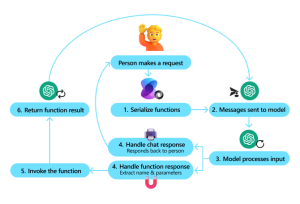
Source: https://learn.microsoft.com/en-us/semantic-kernel/concepts/ai-services/chat-completion/function-calling/?pivots=programming-language-csharp
In SemanticKernel you can define plugins as simple classes. In its most basic form no attributes or anything else are needed. You can just define public methods on the class that will act as a plugin. The names of the methods and its parameters are important here because SemanticKernel will use reflection to see what kind of logic and/or data is exposed by the methods in the plugin class. If you want to give the LLM more information about what a method does you can add attributes to the methods to explain the method, it’s parameters and it’s response in more detail. As an example let me define a plugin that can return the weather in a given city. A LLM will never know the current weather because it is not trained on that data. A plugin could give the LLM this information. This plugin could look like the following.
using Microsoft.SemanticKernel;
using System.ComponentModel;

namespace OpenAIPlugins.Plugins;

public class WeatherPlugin(HttpClient httpClient)
{
    [KernelFunction("get_weather_of_city")]
    [Description("Gets the current weather in a given city")]
    [return: Description("A string containing the weather in the requested city")]
    public async Task GetWeatherAsync(string city)
    {
        var response = await httpClient.GetStringAsync($"https://api.weatherapi.com/v1/current.json?key=[YOUR_API_KEY]&q={city}"); // register for free on weatherapi to see this in action using your own API key
        return response;
    }
}
As you see this is a simple class that has a method to get the weather in a given city. Now we have the plugin ready we need to register it in SemanticKernel. You can easily do this.
kernel.Plugins.AddFromType("WeatherPlugin");
Next to registering the plugin we need to tell SemanticKernel that we want it to automatically execute functions registered in plugins. We can do that by adding the following code snippet.
OpenAIPromptExecutionSettings openAIPromptExecutionSettings = new()
{
    FunctionChoiceBehavior = FunctionChoiceBehavior.Auto(),
};
Now we have everything in place and we can start testing. The complete solution containing the example above can be found on in my GitHub repository:
https://github.com/henthoven/SemanticKernelPlugins/
The example in my GitHub repository is a console application that will ask the user for input and then send a response back to the console. But before sending the response to the console SemanticKernel will do its magic and call a function on the weather plugin if needed. So when you start the application and ask a question like “What is the current weather in Amsterdam?” SemanticKernel will interpret the question, try to match a function, and call our weather function, get the current weather and send that back to the LLM. The LLM will than make a nice readable answer containing the current weather in Amsterdam. This answer would not have been possible without the plugin because the LLM does not have any recent weather information.
When exiting the console application it will also output the chat history that will show you the interaction between the LLM and SemanticKernel. Go check it out! 😉
3️⃣ Conclusion
Looking at SemanticKernel I think it is a great library that acts as an abstraction layer to talk to your LLM. It is not only abstracting away a lot of complexity but also has great features like plugins that make it easy to integrate your own code with the LLM. If you really want to use this in your production systems there are some things to be aware of:
- Data returned from your plugins will be send to the LLM. Be aware of that
- Make sure you define your functions well, the LLM will decide if a functions will be called or not. This can lead to unexpected behavior
- Be aware of the performance of your methods, it can heavily influence the response time of the LLM
- Also think about costs. Most AI services charge per token. The function calling principle will interact with the LLM in the background and all that interaction will use tokens
Thanks for reading and if you have any questions or suggestions feel free to contact me.

Hans Enthoven
Hans kent .NET en C# als geen ander. In zijn blogs neemt hij je onder andere mee door te nieuwste feature van onze favoriete ontwikkelstack.
Written by: Hans Enthoven
Hans is a software developer with over 20 years of experience. As a software developer he has lots of experience developing for the Microsoft platform. In these 20 years Hans has carried out many different projects in different environments. Hans describes himself as a professional software engineer with a lot of experience within Microsoft technology. Next to developing Hans also coaches people on the job and likes to give presentations to share his knowledge with other people.
Mission: Building structured, reusable and maintainable software that that matters in this society.
Want to know more about our experts? Contact us!
